Your PM Awas Yojana status tells you whether your house has been sanctioned and which installment has been released. Pradhan Mantri Awas Yojana (PMAY) provides financial help to build or buy a pucca house and has two parts — PMAY-Gramin for rural areas and PMAY-Urban for towns and cities. This guide shows how to check your PM Awas Yojana status and find your name in the beneficiary list for both.
How to check PMAY-Gramin (rural) status
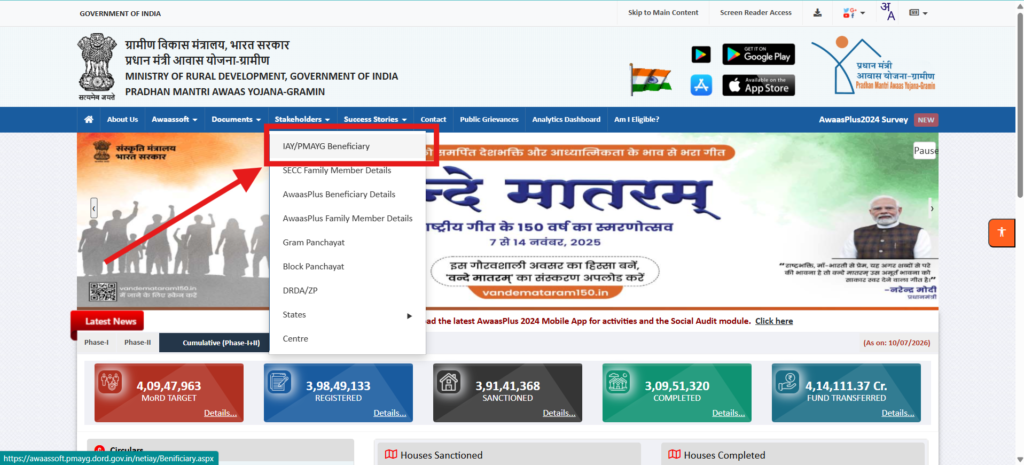
- Open the official portal pmayg.dord.gov.in/netiayHome.
- Go to Stakeholders and click IAY / PMAYG Beneficiary.
- Enter your Registration Number and click Submit to see your status.
- If you do not have the registration number, use Advanced Search with your name, state, district and block.
How to check PMAY-Urban status
- Open the PMAY-Urban portal pmaymis.gov.in.
- Click Search Beneficiary and then Search by Name.
- Enter your name and Aadhaar or mobile number to view your application status.
PM Awas Yojana status stages explained
- Registered — your application is recorded in the system.
- Sanctioned — your house has been approved for assistance.
- Installment released — the first, second or third installment has been transferred after verification.
- Completed — construction is verified and the house is marked complete.
Common problems and how to fix them
- Name missing from the list — verify your application at your Gram Panchayat (rural) or ULB office (urban).
- Installment delayed — this is usually because geo-tagging or field verification is pending.
- Wrong details — get them corrected through your local implementing office.
See our detailed PM Awas Yojana Gramin list guide for more.
Details you need before checking
To check your PM Awas Yojana status for PMAY-Gramin you mainly need your Registration Number; if you do not have it, your name, state, district and block are enough for Advanced Search. For PMAY-Urban you need your name and Aadhaar or mobile number. Keeping your sanction letter or application slip handy makes it easier to match your record.
How much assistance PMAY gives
Under PMAY-Gramin, eligible families receive assistance to build a pucca house (with additional support for toilets and other convergence schemes), released in installments after each stage is verified. Under PMAY-Urban, benefits depend on the vertical you qualify for, such as the Credit-Linked Subsidy or Beneficiary-Led Construction. Your status page shows which installment or stage you have reached.
How to raise a complaint
If your PM Awas Yojana status shows your name missing or an installment stuck, first confirm your record at your Gram Panchayat or ULB office. You can also lodge a grievance through the portal’s grievance section, or call the PMAY-Gramin helpline 1800-11-6446 or PMAY-Urban helpline 1800-11-3377.
Track your PMAY installment in your bank account
Your PM Awas Yojana status page updates as each installment is released. Once your status shows an installment as released, the money is transferred directly to your Aadhaar-linked bank account through DBT. Check your passbook or SMS alerts a few days after the release date. If the status shows an installment as released but the amount has not arrived, confirm that your bank account is correctly seeded with Aadhaar and is active. For a long delay, take your registration number and bank passbook to your Gram Panchayat, ULB office or bank branch so they can trace the transfer. Never share your bank OTP or card details with anyone who claims they can release your PMAY installment faster.
Frequently asked questions
How can I check the PMAY beneficiary list by name?
To find your PM Awas Yojana status, on pmayg.nic.in use Advanced Search, or on pmaymis.gov.in use Search Beneficiary by name, then enter your details to see if your name is on the list.
What are the PMAY installment stages?
Assistance is released in stages after verification — typically on sanction, on reaching the plinth or lintel level, and on completion of the house.
Is there a helpline for PM Awas Yojana?
Yes. PMAY-Gramin support is available at 1800-11-6446 and PMAY-Urban at 1800-11-3377 / 1800-11-3388.
Disclaimer: PMYojanaUpdates.com is an independent information portal and is not affiliated with any government body. Always use the official portal pmayg.nic.in and pmaymis.gov.in for the latest status and downloads.