
The e-Shram card registers unorganised workers on a national database and gives each worker a Universal Account Number (UAN) along with access to welfare and accident insurance benefits. This guide explains how to check your e-Shram card status online, download the UAN card, and view your registration details. A quick e-Shram card status check confirms your UAN is active and your information is correct. For other benefits, see our PM Kisan status guide or our status check hub.
How to check e-Shram card status online
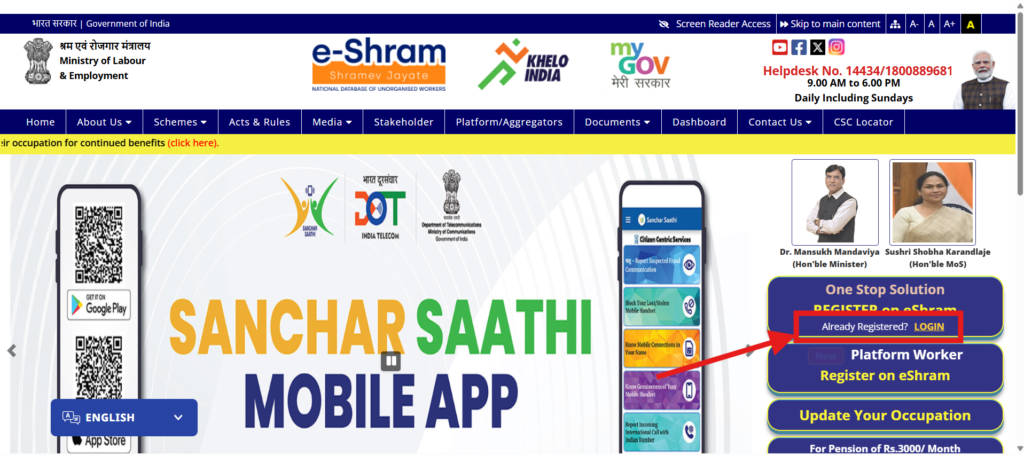
- Open the official portal eshram.gov.in.
- Click Already Registered → Update / Download UAN Card.
- Log in with your UAN or Aadhaar-linked mobile number and the OTP.
- Your e-Shram profile and card status appear on the screen.
How to download the e-Shram card
- After logging in, open the Download UAN Card option.
- Check that your details are correct.
- Click download to save the e-Shram card as a PDF.
Checking your e-Shram benefits and ‘balance’
Your e-Shram card status page shows your registration details, not a wallet balance — the e-Shram card itself does not hold a cash balance. Benefits reach you through linked schemes such as the PM-SYM pension and PMSBY accident insurance. Be careful of messages promising a fixed ‘e-Shram balance’ of ₹1,000 or ₹3,000 — always verify any benefit only on the official portal or through your state labour department.
Common problems and how to fix them
- Mobile not linked to Aadhaar — update your mobile number at an Aadhaar centre, since the OTP is sent there.
- Wrong details — use the Update option after login to correct them.
- Card not downloading — try a different browser or complete it at your nearest CSC.
Who can make an e-Shram card
Any unorganised worker aged between 16 and 59 — such as a construction worker, street vendor, domestic worker, farm labourer, driver or gig worker — who is not a member of EPFO or ESIC and is not an income-tax payer can register. Registration and the card are completely free on the official portal or at a CSC.
Benefits linked to your e-Shram card
- Accident insurance — registered workers get accidental death and disability cover under PMSBY.
- Pension — eligible workers can join the PM-SYM scheme for a monthly pension after age 60.
- Welfare schemes — the UAN helps state and central departments deliver targeted welfare benefits to you.
Because a single UAN links all these benefits, keep your e-Shram profile and mobile number up to date so any future scheme payment reaches you without a hitch.
Keep your e-Shram details updated
Your e-Shram profile should always show the correct mobile number, bank account and occupation, because departments use these details to send scheme benefits. To update them, log in with your UAN or mobile OTP, open the Update section, change the field and save. There is no yearly renewal fee and the card stays valid, but you should review your details whenever you change your phone number, bank account or type of work. Always update through the official portal or a CSC, and ignore any private website or agent that asks for money to ‘renew’ your e-Shram card.
Related status guides
Track other benefits with our PM Kisan status guide or browse all government schemes. Checking your e-Shram card status every few months keeps your UAN and bank details correct, so any linked scheme payment reaches you without delay.
More status guides
- PM Kisan beneficiary status
- Ayushman card status & download
- PM Awas Yojana status
- Ration card status
- EPF / PF claim status
Frequently asked questions
Is there any money credited in the e-Shram card?
Your e-Shram card status page never shows a cash balance because the e-Shram card does not directly credit money. It gives you a UAN and access to linked welfare and insurance schemes; any payment comes from those specific schemes, not the card itself.
How do I download the e-Shram card without a registered mobile number?
You need an Aadhaar-linked mobile number for the OTP. If it is not linked, visit a CSC (Common Service Centre) with your Aadhaar to download the card.
What is the e-Shram helpline number?
The national e-Shram helpline number is 14434. You can call it for registration and e-Shram card status help.
Disclaimer: PMYojanaUpdates.com is an independent information portal and is not affiliated with any government body. Always use the official portal eshram.gov.in for the latest status and downloads.